Oracle Authorization Connector
Overview
The Oracle Authorization Connector provides OAuth authentication for Oracle Cloud services. It enables Dodeca connectors to securely authenticate users against Oracle Identity Cloud Service (IDCS) and Oracle Cloud Infrastructure Identity Domains when accessing Oracle services such as Oracle EPM Cloud.
Once imported and configured, the connector provides OAuth access tokens that are used by Oracle-based connectors, including the Dodeca PBCS/EPM Cloud Connector.
Prerequisites
-
An Oracle Integrated Application (OAuth application) configured in Oracle Identity Cloud Service (IDCS) or Oracle Cloud Infrastructure Identity Domains.
-
The
ClientIDfor the OAuth application. -
The
TenantIDfor the Oracle Identity domain. -
For
Authorization_Codeauthentication, an allowed redirect URI that matches the connection’sRedirectUrivalue.
For instructions on creating and configuring an Oracle Integrated Application, see the Integrated Application documentation.
Getting Started
To begin using the Oracle Authorization Connector, download and import the Oracle Authorization Connector module into the Dodeca tenant. After importing the module and restarting the Dodeca application, create a new Oracle Authorization connection and configure it using the connection properties below.
The connector supports two OAuth grant types:
-
Authorization_Code(recommended) -
Device_Code
The Authorization_Code grant type is the default authentication flow and is the primary focus of this documentation. The Device_Code grant type is intended for environments where browser-based authentication is not practical.
Oracle Authorization Connection Properties
Connection Properties
The following properties are used to configure an Oracle Authorization connection.
| Property | Requirement | Description |
|---|---|---|
GrantType |
Required |
The OAuth grant type to use. Defaults to |
TenantID |
Required |
The Oracle Identity tenant identifier. This is the alphanumeric portion of the Oracle Identity URL (for example, |
ClientID |
Required |
The Client ID of the Oracle Integrated Application configured in Oracle Identity Cloud Service or Oracle Identity Domains. |
RedirectUri |
Optional (depending on |
Redirect URI used during OAuth authentication. Required (as a valid absolute URI) for |
The TenantID can be found in the browser address bar while signed into the Oracle Identity administration console.

The ClientID is available on the OAuth Configuration page of the Oracle Integrated Application.
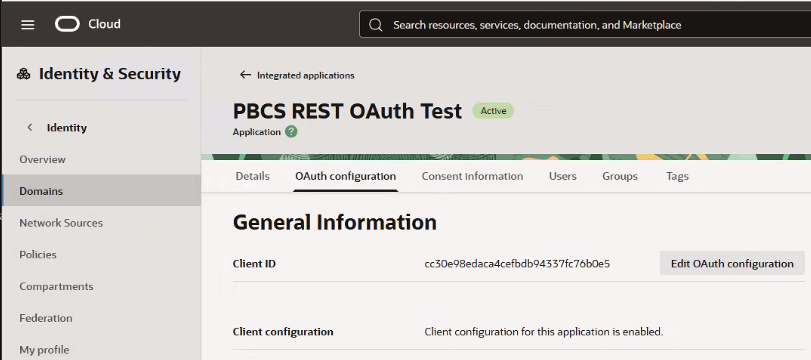
After entering the required connection properties, the Oracle Authorization connection will resemble the following.
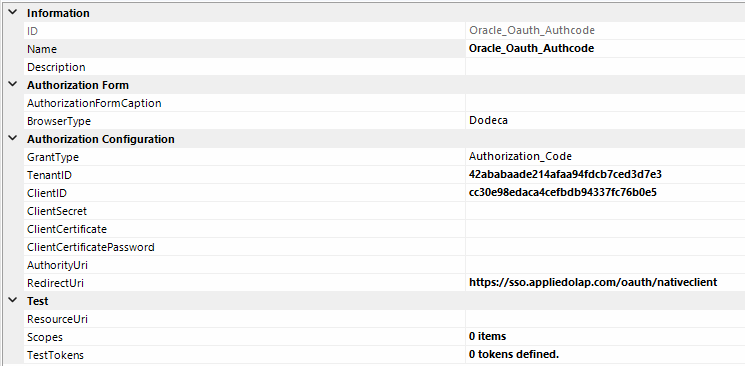
Test Properties
Scopes controls the OAuth scopes requested when testing an Oracle Authorization connection directly and is required for a direct connection test.
| Property | Requirement | Description |
|---|---|---|
Scopes |
Required |
OAuth scopes requested during testing. |
When this connection is used by another connector, such as the Dodeca PBCS/EPM Cloud Connector, the consuming connector supplies the required scopes. In that case, this test property can remain unset.
Using the Oracle Authorization Connector
To configure and verify the connector, follow these steps:
-
Download and import the latest Oracle Authorization Connector module into the Dodeca tenant.
-
Restart the Dodeca application. The Oracle Authorization Connector is now available for use.
-
Create an Oracle Authorization connection and select the appropriate
GrantType. UseAuthorization_Codeunless the environment requires the device authorization flow. -
Enter the
TenantIDandClientID. If necessary, changeRedirectUrito an allowed redirect URI configured for the Oracle Integrated Application. -
To test the connection directly, enter the required
Scopes, then test the connection and complete the Oracle sign-in flow. A successful test returns an OAuth access token. -
Commit the connection metadata.