Dodeca Microsoft Authorization Connector
Overview
The Microsoft Authorization Connector provides an authorization mechanism for Dodeca applications. It enables OAuth-based authorization and returns access tokens that can be used by other connectors, such as Microsoft Copilot and additional Microsoft-integrated services.
The Microsoft Authorization Connector is implemented as a native connector module and can be imported into a Dodeca tenant like any other connector module.
Prerequisites
Before configuring the Microsoft Authorization Connector, the following are required:
-
Access to a Microsoft Entra application registration.
-
ClientID and TenantID values from the Microsoft Entra application registration.
Getting Started
To begin using the Microsoft Authorization Connector, the connector module must first be imported into the Dodeca tenant. After importing the module, a Microsoft Authorization connection can be created and configured.
Entra Delegated Connection Properties
The following properties are required for a Microsoft Entra delegated authorization connection.
| Property | Requirement | Description |
|---|---|---|
TenantID |
Required |
The Microsoft Entra tenant identifier. |
ClientID |
Required |
The application (client) identifier registered in Microsoft Entra. |
Using the Microsoft Authorization Connector
To configure the Microsoft Authorization Connector, follow these steps:
-
Download and import the latest version of the Microsoft Authorization Connector module into the Dodeca tenant.
-
Restart the Dodeca application. The connector is now available for use.
-
Create and configure a Microsoft Authorization connection using the properties above.
-
Test the connection to verify the authorization credentials and OAuth configuration are valid.
-
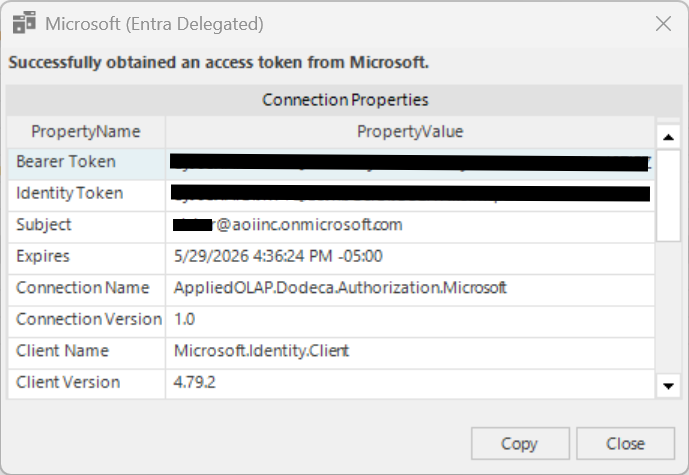
A Microsoft sign-in window will appear prompting for credentials. After successfully signing in, the connection test will complete and display the access token returned from Microsoft Entra.
The following will be displayed if the connection is successful.