Dodeca PBCS/EPM Cloud Connector
Background
The Dodeca PBCS Connector provides integration between Dodeca views and a PBCS/EPM Cloud server. It uses the PBCS REST API to perform data and metadata operations, such as grid retrieves and fetching member information.
In this document, the names "PBCS Connector" and "EPM Cloud Connector" are used interchangeably. This connector can also be used to provide secure connectivity to Oracle EPM Cloud services, including Planning, Financial Consolidation and Close (FCCS), Profitability and Cost Management (PCM), and other supported EPM Cloud applications that use the same core Planning REST APIs.
Requirements
The connector requires Java 17 or later installed on the host machine (Java 21 is recommended). The connector works on Windows, Linux, and macOS servers.
Installing the Dodeca PBCS Connector
The connector is available from Applied OLAP. To install the Dodeca Cloud EPM Connector, follow the steps below:
-
Download the Dodeca PBCS Connector: https://downloads.appliedolap.com/products/dodeca-pbcs-connector
-
Unzip the EPM Connector zip file to a well-known location.
-
Ensure Java 17 or later (Java 21 recommended) is on the
Pathenvironment variable, or edit thewrapper.confwrapper.java.command=javasetting to point to a fully qualified path to Java. -
Open a command prompt and change the directory to
<Unzipped Folder>\dodeca-pbcs-connector-<version>\bin\. -
Invoke the EPM Connector installation via
dodeca-pbcs-connector.bat installon the command prompt. -
Start the service with the
dodeca-pbcs-connector.bat startcommand on the command prompt, or open the Services on the server, findDodeca PBCS Connector, and start it. -
Enter
http(s)://<Server Name>:<port>in a browser to verify the installation and service start occurred correctly. The default port is9440.
For SSL implementation, contact support at support@appliedolap.com.
Upgrading the Dodeca PBCS Connector
Upgrading the Dodeca PBCS Connector includes stopping and removing the existing service, installing and starting the updated service, and testing the updated service.
-
Download the new connector version from the Applied OLAP website.
-
Unzip the new connector version to a well-known location, preferably the same location as the existing version.
-
Stop the existing PBCS Connector version through Services, or on a command prompt point to
<Unzipped Folder>\dodeca-pbcs-connector-<version>\bin\and rundodeca-pbcs-connector.bat stop. -
Remove the existing EPM Connector: point to
<Unzipped Folder>\dodeca-pbcs-connector-<version>\bin\and rundodeca-pbcs-connector.bat removeon a command prompt. -
Change the directory in the command prompt to
<New Unzipped Folder>\dodeca-pbcs-connector-<new version>\bin\. -
Run the
dodeca-pbcs-connector.bat installcommand. -
Start the service with the
dodeca-pbcs-connector.bat startcommand on the command prompt, or open the Services on the server, findDodeca PBCS Connector, and start it. -
Enter
http(s)://<Server Name>:<port>in a browser to verify the installation and service start occurred correctly.
There is no need to copy pbcs.mv.db from the existing version’s folder. It holds only the connector’s cache of EPM Cloud metadata, which the new version builds again as members are requested. If a cache file the connector cannot read is copied forward anyway, such as one from version 1.7, the connector renames it to pbcs.mv.db.<date-time>.unreadable when it starts, logs a warning, and starts with an empty cache. The renamed file can be deleted.
Dodeca Connection Configuration
In order to create a PBCS connection in Dodeca, create an Essbase connection as usual. The following properties are necessary to establish a successful EPM connection.
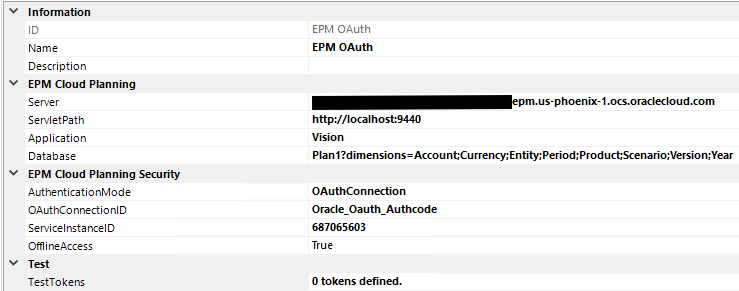
Connection Properties
| Property | Requirement | Description |
|---|---|---|
Server |
Required |
The EPM Cloud server, which is typically a server name such as |
ServletPath |
Required |
The address to the server running the connector, including protocol and port, such as |
Application |
Required |
The name of the application, such as |
Database |
Required |
The name of the plan type (cube), such as |
By default, the connector discovers the cube’s dimensions using Oracle’s documented plan-type dimension endpoint. The Database setting can optionally define the dimension names explicitly instead. To specify them, use the following format:
Plan1?dimensions=Account;Currency;Entity;Period;Scenario;Version;YearsIn other words: the name of the plan type/cube, followed by a question mark, the word dimensions, an = symbol, and then the semicolon-delimited list of dimensions in the plan. An explicit list may be useful for compatibility or troubleshooting if dimension discovery is unavailable or returns an unsuitable list for a particular application.
Example URL for the EPM Server:

Authentication
The connector supports two authentication approaches, controlled by the AuthenticationMode property. It can connect directly with provided user credentials, or as the authenticated user via impersonation using OAuth.
EPM Cloud Planning Security (OAuth)
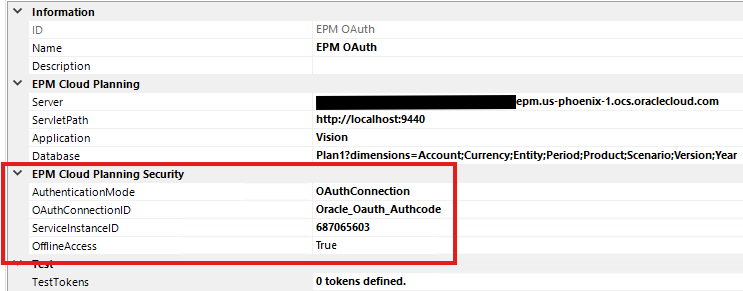
EPM Cloud Planning security integration uses OAuth-based authentication to securely establish connections between services. It relies on an OAuth connection created with the Dodeca Oracle Authorization Connector.
| Property | Requirement | Description |
|---|---|---|
AuthenticationMode |
Required |
Specifies whether to connect directly with provided user credentials or as the authenticated user via impersonation. |
OAuthConnectionID |
Required |
The ID of an OAuth connection created with the Dodeca Oracle Authorization Connector. |
ServiceInstanceID |
Required |
Obtained from the same Integrated Application used to configure the Oracle Authorization connection. See Integrated Application for the steps to create one. |
Authorization Code configuration
The recommended OAuth flow for an EPM Cloud connection is Authorization_Code. The flow is provided by the Dodeca Oracle Authorization Connector; the PBCS connector requests an access token from that connection for the configured EPM service.
To configure the flow:
-
Create an Oracle Integrated Application for the target EPM Cloud service. Enable the Authorization code and Refresh token grants, add the OAuth resource/scope for the EPM service, and register the redirect URI
https://sso.appliedolap.com/oauth/nativeclient(or another HTTPS redirect URI that is also configured in the Oracle Authorization connection). See Integrated Application for the complete Oracle setup, including locating theServiceInstanceID. -
Import the Oracle Authorization Connector into the Dodeca tenant and restart the application.
-
Create an Oracle Authorization connection with these properties:
-
GrantType:Authorization_Code(the default and recommended value) -
TenantID: the Oracle Identity domain identifier -
ClientID: the client ID of the Integrated Application -
RedirectUri:https://sso.appliedolap.com/oauth/nativeclient, unless a different registered URI is required
-
-
Set the PBCS connection’s
AuthenticationModetoOAuthConnection, setOAuthConnectionIDto the Oracle Authorization connection, and setServiceInstanceIDto the identifier for the target EPM Cloud service. -
Test the PBCS connection and complete the Oracle sign-in flow when prompted.
The Oracle Authorization Connector also supports Device_Code for environments where browser-based authorization is not practical. Use Authorization_Code unless that limitation applies.
Native Account Credentials
In addition to OAuth, the connector supports connecting with the username and password of a native EPM Cloud (PBCS) account. This is useful when you want to connect using a fixed admin or otherwise native user.
- Username
-
The username of a fixed admin or otherwise native user to use for connecting.
- Password
-
The password of a fixed admin or otherwise native user to use for connecting.
When an OAuth authorization is supplied, it is used for the connection; otherwise the connector falls back to the configured username and password.
Getting Started
-
Create a new EPM Connection.
-
Enter the EPM Server name, Application, and Database.
-
The ServletPath is
http(s)://<Server Name>:<port>(the default port is9440). -
Set the
AuthenticationModetoOAuthConnection. -
Create and configure an Oracle OAuth connection using the Dodeca Oracle Authorization Connector, then set
OAuthConnectionIDto reference it. -
Set
ServiceInstanceID, obtained from the same Integrated Application (see Integrated Application). -
Test the connection.
-
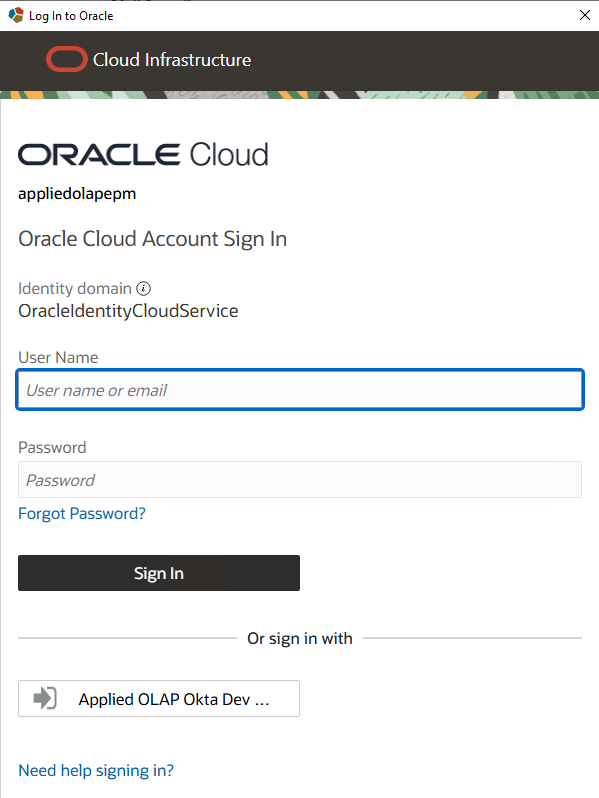
Enter Oracle Cloud credentials.
Oracle Credentials:
Successful Connection:
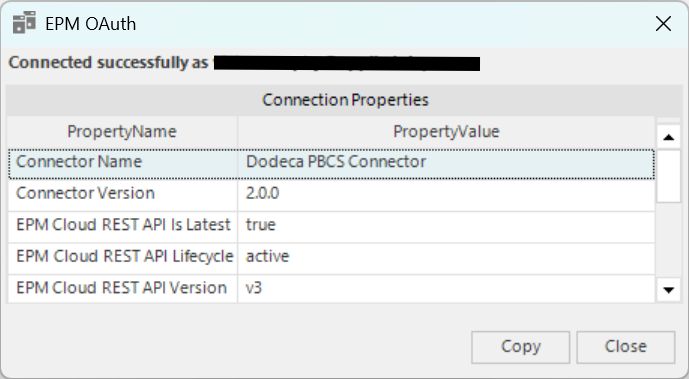
Once the connection details are filled in, save and test the connection. You may now build views that use the PBCS data in a retrieve range.
Additional Connection Parameters
In addition to the dimensions key, the Database connection string supports several optional parameters. Multiple parameters can be combined using &, for example Basic?dimensions=Scenario;Period&aliasTables=Alias2;French&maxCellsPerRetrieve=200000&maxConcurrentRetrieveRequests=4.
- attributeDimensions
-
Attribute dimensions may be specified using the
attributeDimensionskey on a connection string (they may still be specified in thedimensionskey). This allows the connector to exclude attribute dimensions from certain operations such as the default retrieve. - aliasTables
-
Semicolon-delimited list of additional alias tables known to exist for the plan, such as
aliasTables=Alias2;French. Oracle EPM Cloud does not provide a supported REST API for enumerating alias tables, so the connector trusts these names without validating them. TheDefaultalias table is always included automatically. Configured tables are advertised to Dodeca and may be selected using the view’sEssProperties.AliasTableproperty.
The aliasTables parameter does not require an explicit dimension list. For example, Basic?aliasTables=Alias2;French uses automatic dimension discovery while advertising the configured alias tables.
- maxCellsPerRetrieve
-
Controls how many cells are used in a single retrieve. The EPM Cloud REST API has an upper limit of 500,000 cells, including member cells. The default if not explicitly configured is 400,000 (which allows for comfortably being under the limit). Administrators may want to set this lower so that retrieves that are broken up into multiple pages are smaller, which may yield faster overall retrieve times.
- maxConcurrentRetrieveRequests
-
Controls how many pages of a split retrieve may be requested concurrently. This option is only used when a retrieve exceeds
maxCellsPerRetrieve; retrieves that fit in one request use the normal direct path. The default is configured byconnector.retrieve.max-concurrent-requestsinapplication.propertiesand is1, which preserves sequential behavior. Page responses are stitched back together in their original row order.
All parallel retrieve pages use one connector-wide executor. The connector.retrieve.executor-threads property controls its global thread limit. The tracked value is 0, which automatically uses the smaller of the server’s available processor count or eight; set a positive value to configure the limit explicitly.
- searchThreads
-
Uses the specified number of threads when performing member/alias search.
- clearCache
-
Set
clearCache=trueon the cube/plan settings to clear cached member metadata for that EPM Cloud server, application, and plan. Cached metadata for other connections and plans is left intact. This should only be used temporarily (for example, set this parameter, test the connection, then change it back).
Advanced Configuration
Proxy Configuration
The Dodeca PBCS Connector can be configured to use a proxy for communications between itself and your PBCS (EPM Cloud) server. In order to do so, two settings will need to be added to your wrapper.conf configuration file:
wrapper.java.additional.4=-Dhttps.proxyHost=localhost
wrapper.java.additional.5=-Dhttps.proxyPort=8080
Configure the name and port for your proxy server instead of localhost and 8080. If you already have additional settings in the configuration file, use the next available number if it is not 4 (so that you end up with a continuous set of settings numbers).
Log Files
The connector writes its log to logs\wrapper.log in the folder it was unzipped to. When the log reaches 10 MB, it is renamed wrapper.log.1, older logs move up a number, and a new wrapper.log is started. The ten most recent rolled logs are kept and older ones are deleted, so the logs take at most about 110 MB.
Two settings in wrapper.conf control this:
wrapper.logfile.maxsize=10m
wrapper.logfile.maxfiles=10
wrapper.logfile.maxsize is the size at which the log is rolled, and wrapper.logfile.maxfiles is how many rolled logs are kept. Restart the connector service after changing either one.
Versions 2.0.5 and earlier ship with both set to 0, which never rolls the log, so it grows without limit. To roll the log in one of those versions, or after upgrading with a wrapper.conf kept from one, set them to the values above and restart the service. A log that is already larger than wrapper.logfile.maxsize is renamed wrapper.log.1 when the service starts, so it can be deleted straight away rather than left to age out.
Enable Additional Logging
More fine-grained output/debug logging information can be shown in the log by adjusting to a higher level such as DEBUG or TRACE. These settings should not be used long-term in production. To enable additional logging for certain modules, the following lines can be used:
wrapper.java.additional.X=-DROOT_LOG_LEVEL=TRACE
wrapper.java.additional.Y=-Dlogging.level.com.appliedolap=TRACE
wrapper.java.additional.Z=-Dlogging.level.com.jasonwjones=TRACE
Replace X, Y and Z with the next available wrapper.java.additional numbers in your wrapper.conf configuration file. The first line allows messages below INFO to be logged at all; without it, the other two lines have no effect. The second line sets the logging level for the connector, and the third enables additional logging for the Java PBCS module.
The log rolls at a fixed size (see Log Files), so with additional logging the rolled logs cover a shorter period of time. Raise wrapper.logfile.maxfiles if more needs to be kept.
Clear All Member Caches with an HTTP POST
The connector provides an optional administrative endpoint for clearing all cached member metadata without restarting the service or temporarily editing a connection. The endpoint is disabled by default and requires a bearer token containing at least 32 characters when enabled.
Add the following settings to wrapper.conf, replacing X and Y with the next available wrapper.java.additional numbers and replacing the example token with a long, randomly generated secret:
wrapper.java.additional.X=-Dconnector.admin.cache-clear.enabled=true
wrapper.java.additional.Y=-Dconnector.admin.cache-clear.token=REPLACE_WITH_A_RANDOM_TOKEN_OF_AT_LEAST_32_CHARACTERS
Protect wrapper.conf from unauthorized access because it contains the bearer token, then restart the connector service for the settings to take effect.
Send an authenticated POST request to /admin/cache/clear. For a connector using the default port on the local host:
curl --fail-with-body --request POST --header "Authorization: Bearer REPLACE_WITH_THE_CONFIGURED_TOKEN" http://localhost:9440/admin/cache/clearA successful request returns HTTP 200 with the following response:
{"status":"cleared","scope":"all"}A missing or incorrect token returns HTTP 401, and methods other than POST are not allowed. The operation clears member caches for every EPM Cloud server, application, and plan served by this connector instance. To clear only one plan, use the temporary clearCache=true connection parameter instead.
Run the command locally on the connector host when possible. If it must be invoked across a network, protect the connection with HTTPS or an equivalently trusted encrypted channel so that the bearer token is not transmitted as clear text.
Outline Caching
Dodeca PBCS/EPM Connector 1.6 and higher provides advanced caching capabilities. Whenever the connector needs to resolve member metadata (such as part of the retrieve process for a grid), the member information is cached for subsequent operations, so the first request for a given member pays the lookup cost and later requests are served from cache automatically. Caching has since become aggressive enough that there is no longer a need to manually preload the outline ahead of time; a separate conncli.jar CLI tool that previously existed for this purpose is no longer necessary and is not shipped with the connector.
Dimensional Query Expressions
EPM Cloud does not support traditional report scripts or member queries. The EPM Cloud Connector provides a custom expression language called Dimensional Query Expressions to support many of these use cases for populating selector lists.
Creating and Using a DQE Script
Dodeca does not currently provide a separate Essbase script type for DQE. Create a DQE in the Essbase Scripts metadata editor as a Member Query script and enter the DQE expression as the script text. The PBCS Connector recognizes the member-query text as DQE and evaluates it against the selected EPM Cloud application and database.
A saved DQE script can be used anywhere Dodeca accepts an Essbase Member Query script. For example, assign its script ID to a selector list’s MemberQueryScriptID property to use the DQE to populate that selector list.
Although DQE uses the Member Query script type for authoring and execution, its contents use the DQE syntax documented below rather than traditional Essbase member-query syntax.
Choosing the Output Columns
By default a DQE returns one member name per row. A DQE can instead return several columns per row, by beginning the script with a format preamble: a list of output options in braces, before the expression.
Syntax:
{OPTION OPTION ...}expression
<FORMAT { OPTION OPTION ... } expression
Both forms are equivalent. The second echoes the <FORMAT { … } command of a traditional Essbase report script, and is the more familiar spelling for anyone coming from report scripts.
The following options are available:
MBRNAMES-
Include the member name.
ALTNAMES-
Include the member’s alias from the requested alias table, or an empty column when the member has no alias in that table.
LEVELNUMBERS-
Include the member’s level number. Levels count up from the leaves of the dimension, so a member with no children is level 0.
GENERATIONS-
Include the member’s generation number. Generations count down from the dimension itself, which is generation 1.
STATUSES-
Include a numeric member status. A plain member reports 1024; a shared member adds 4, reporting 1028.
Columns are separated by a tab and always appear in the order listed above, whatever order the options are written in. Writing {LEVELNUMBERS MBRNAMES} therefore returns the name first and the level second, exactly as {MBRNAMES LEVELNUMBERS} does.
When a script has no format preamble, it returns member names alone, or aliases alone when the request asks for an alias table.
For example, returning each member with its level number:
{MBRNAMES LEVELNUMBERS}Children('Q1')Result:
Jan	0
Feb	0
Mar	0
Several options can be combined. Given a Market dimension whose children are regions and whose grandchildren are states, the following returns the name, alias, level and generation of every member of that dimension:
{MBRNAMES ALTNAMES LEVELNUMBERS GENERATIONS}IDescendants('Market')Result:
Market		2	1
East	East	1	2
New York	New York	0	3
Massachusetts	Massachusetts	0	3
Note that Market itself has no alias in this example, so its alias column is empty, and that its level is 2 because the deepest branch beneath it is two levels tall.
Shared members can be told apart with STATUSES. Given a Diet parent whose children are shared members of products stored elsewhere in the dimension:
{MBRNAMES GENERATIONS STATUSES}Children('Diet')Result:
100-20	3	1028
200-20	3	1028
300-30	3	1028
Hierarchy Function
The Hierarchy function reorders an existing member set from a single dimension according to the dimension’s outline hierarchy. It does not expand the member set, remove members, or add members; it only changes their order. This is useful after combining member sets because operations such as + preserve the order of their operands rather than automatically restoring outline order.
Syntax:
Hierarchy(memberSet)
Hierarchy(memberSet, NATURAL)
Hierarchy(memberSet, POST)
The optional ordering argument supports the following values:
NATURAL-
Places each parent before its descendants in their natural outline order. This is the default when the ordering argument is omitted.
POST-
Places descendants before their parent, so each parent follows all of its children.
For example, adding the children of Q2 before the children of Q1 preserves that expression order:
Children('Q2') + Children('Q1')Result:
[Apr, May, Jun, Jan, Feb, Mar]Wrapping the same expression in Hierarchy restores natural outline order:
Hierarchy(Children('Q2') + Children('Q1'))Result:
[Jan, Feb, Mar, Apr, May, Jun]The POST option can be used when parents should follow their descendants:
Hierarchy(IDescendants('YearTotal'), POST)Result:
[Jan, Feb, Mar, Q1, Apr, May, Jun, Q2, Jul, Aug, Sep, Q3, Oct, Nov, Dec, Q4, YearTotal]Pov and Data Functions
The Data function filters a member set down to the members that have data, and the Pov function describes where to look for that data.
Syntax:
Pov(member, ...)
Data(pov, memberSet)
Data(pov)
Pov takes zero or more member names and returns those members, plus the top member of every dimension that is not named, in dimension order. Pov() alone is the top of the house: (Account, Period, Entity, Scenario, Version, …).
A dimension can be named more than once, for example several months. Pov keeps every member it is given, and Data then looks for data in any of them. This is what a grid of those months shows with missing rows suppressed.
Data(pov, memberSet) returns the members of memberSet that have data at the POV, in their original order. If the POV also names a member of the member set’s dimension, the member set takes its place.
The member set can also be a cross join. Each tuple is checked at its own intersection, and the tuples with data come back whole, with every column. For example, this returns each pairing of Sales East with a level-0 Statistics member that has data in October:
Data(Pov('FY24', 'Oct', 'Working', 'Actual', 'USD'), Crossjoin(Member('Sales East'), Descendants('Statistics', 0)))For example, this returns the level-0 Statistics members with data in at least one of July through November of FY24:
Data(Pov('FY24', 'Jul', 'Aug', 'Sep', 'Oct', 'Nov', 'Working', 'Sales East', 'Actual', 'USD'), Descendants('Statistics', 0))A member with data in August and September but not in November is returned. With a single month in the POV, only that month is checked. When more than one dimension is named more than once, every combination of their members is checked.
Data(pov) returns the members of the POV’s last dimension that have data anywhere in the rest of the POV.
Examples
Shows that % is alias for intersection function
Expression:
(Children('Q1') % Regex(Descendants('YearTotal'), 'J.*'))Result:
[Jan]Subtract one set from another
Expression:
IDescendants('YearTotal') - Leaves(Member('YearTotal'))Result:
[YearTotal, Q1, Q2, Q3, Q4]Combination of descendants and regex
Expression:
Descendants('YearTotal', 0) - Regex(Descendants('YearTotal', 0), 'J.*')Result:
[Feb, Mar, Apr, May, Aug, Sep, Oct, Nov, Dec]Expand shared members to include the descendants of the original member
Expression:
Shares(IDescendants('Administrative VP'))Result:
[Administrative VP, Administrative Director 1, 730, 740, 750, 760, 770, 830, 840, Administrative Director 2, 600, 710, 720, 810, 815, CEO, CFO]Regex to return only items that start with 1-5
Expression:
Regex(Leaves('Entity'), '^[1-5].*')Result:
[110, 111, 112, 120, 130, 140, 210, 220, 230, 110, 111, 112, 120, 130, 140, 210, 220, 230, 240, 410, 420, 421, 422, 423, 430, 440, 450, 501, 509, 510, 511, 519, 520, 530, 535, 540, 550, 555, 560, 570, 575, 580, 585, 590, 595, 240, 410, 420, 421, 422, 423, 430, 440, 450, 501, 509, 510, 511, 519, 570, 575, 580, 585, 590, 595, 520, 530, 535, 540, 550, 555, 560]The children function returns the children of the given member (shows function names are case-insensitive)
Expression:
CHILDREN('Q1')Result:
[Jan, Feb, Mar]Return just the level-0 descendants (leaves) of the given member/set
Expression:
Leaves('YearTotal')Result:
[Jan, Feb, Mar, Apr, May, Jun, Jul, Aug, Sep, Oct, Nov, Dec]Descendants with a generation (positive values)/level (negative values and zero) filter results in only descendants with the given level
Expression:
Descendants('YearTotal', -1)Result:
[Q1, Q2, Q3, Q4]Children of the children results in all descendants that are two levels below the original member
Expression:
Children(Children('YearTotal'))Result:
[Jan, Feb, Mar, Apr, May, Jun, Jul, Aug, Sep, Oct, Nov, Dec]Quarters the hard way
Expression:
Descendants('YearTotal') - Children(Children('YearTotal')) - Member('YearTotal')Result:
[Q1, Q2, Q3, Q4]Adding two member sets results in a single member set with all items
Expression:
Children('Q1') + Children('Q1')Result:
[Jan, Feb, Mar, Jan, Feb, Mar]Shows that the multiplication operator works as the Crossjoin function does
Expression:
Leaves('Product') * Leaves('Scenario')Result:
[P_000, P_000, P_000, P_000, P_000, P_000, P_000, P_000, P_000, P_000, P_000, P_000, P_000, P_000, P_000, P_000, P_000, P_000, P_000, P_000, P_000, P_000, P_000, P_000, P_000, P_000, P_000, P_000, P_000, P_000, P_000, P_000, P_000, P_000, P_000, P_000, P_000, P_000, P_000, P_000, P_000, P_000, P_000, P_000, P_000, P_000, P_000, P_000, P_000, P_000, P_000, P_000, P_000, P_000, P_000, P_000, P_000, P_000, P_000, P_000, P_000, P_000, P_000, P_000, P_000, P_000, P_000, P_000, P_000, P_000, P_000, P_000, P_000, P_000, P_000, P_000, P_000, P_000, P_000, P_000, P_000, P_000, P_000, P_000, P_000, P_000, P_000, P_000, P_000, P_000, P_000, P_000, P_000, P_000, P_000, P_000, P_000, P_000, P_000, P_000, P_000, P_000, P_000, P_000, P_000, P_000, P_000, P_000, P_000, P_000, P_000, P_000, P_000, P_000, P_000, P_000, P_000, P_000, P_000, P_000, P_000, P_000, P_000, P_000, P_000, P_000, P_000, P_000, P_000, P_000, P_000, P_000, P_000, P_000, P_000, P_000, P_000, P_000, P_000, P_000, P_000, P_000, P_000, P_000, P_000, P_000, P_000, P_000, P_000, P_000, P_000, P_000, P_000, P_000, P_000, P_000, P_000, P_000, P_000, P_000, P_000, P_000, P_000, P_000, P_000, P_000, P_000, P_000, P_000, P_000, P_000, P_000, P_000, P_000, P_000, P_000, P_000, P_000, P_000, P_000, P_000, P_000, P_000, P_000, P_000, P_000, P_000, P_000, P_000, P_000, P_000, P_000, P_000, P_000, P_000, P_000, P_000, P_000, P_000, P_000, P_000, P_000, P_000, P_000, P_000, P_000, P_000, P_000, P_000, P_000, P_000, P_000, P_000, P_000, P_000, P_000, P_000, P_000, P_000, P_000, P_000, P_000, P_000, P_000, P_000, P_000, P_000, P_000, P_000, P_000, P_000, P_000, P_000, P_000, P_000, P_000, P_000, P_000, P_000, P_000, P_000, P_000, P_000, P_000, P_000, P_000, P_000, P_000, P_000, P_000, P_000, P_000, P_000, P_000, P_000, P_000, P_000, P_000, P_000, P_000, P_000, P_000, P_000, P_000]Adding two member sets results in a single list with orders preserved
Expression:
Children('Q2') + Children('Q1')Result:
[Apr, May, Jun, Jan, Feb, Mar]All descendants including the original member
Expression:
IDescendants('YearTotal')Result:
[YearTotal, Q1, Jan, Feb, Mar, Q2, Apr, May, Jun, Q3, Jul, Aug, Sep, Q4, Oct, Nov, Dec]Filter out items NOT starting with 1-5
Expression:
Regex(Leaves('Entity'), '^[^1-5].*')Result:
[No Entity, Unspecified Entity, Enterprise Global, 000, 000, 600, 710, 720, 730, 740, 750, 760, 770, CEO, CFO, 810, 815, 830, 840, 730, 740, 750, 760, 770, 830, 840, 600, 710, 720, 810, 815, CEO, CFO]Symmetric difference should exclude common items
Expression:
(Children('Q1') ^ Children('Q2')) ^ Regex(Descendants('YearTotal'), 'J.*')Result:
[Feb, Mar, Apr, May, Jul]Apply a regular expression (regex) so that only members from the given set that match are returned (regex J.* matches a J followed by anything)
Expression:
Regex(Descendants('YearTotal'), 'J.*')Result:
[Jan, Jun, Jul]Return intersection of Q1 children as well as members that start with J
Expression:
Intersection(Children('Q1'), Regex(Descendants('YearTotal'), 'J.*'))Result:
[Jan]Converting a member set to a distinct list of members
Expression:
Distinct(Children('Q1') + Children('Q1'))Result:
[Jan, Feb, Mar]Fetch descendants without expanding shares
Expression:
IDescendants('Manufacturing VP')Result:
[Manufacturing VP, Operations Director, 501, 509, 510, 511, 519, 570, 575, 580, 585, 590, 595, Plant Director, 520, 530, 535, 540, 550, 555, 560]Returns members that are in one set or the other, not both
Expression:
(Children('Q1') ^ Children('Q2'))Result:
[Jan, Feb, Mar, Apr, May, Jun]The children function returns the children of the given member
Expression:
Children('Q1')Result:
[Jan, Feb, Mar]Removes one set of members from another (but easier to use the minus (-) operator)
Expression:
Difference(IDescendants('YearTotal'), Leaves(Member('YearTotal')))Result:
[YearTotal, Q1, Q2, Q3, Q4]Shows the crossjoin function creating member permutations
Expression:
Crossjoin(Leaves('Product'), Leaves('Scenario'))Result:
[P_000, P_000, P_000, P_000, P_000, P_000, P_000, P_000, P_000, P_000, P_000, P_000, P_000, P_000, P_000, P_000, P_000, P_000, P_000, P_000, P_000, P_000, P_000, P_000, P_000, P_000, P_000, P_000, P_000, P_000, P_000, P_000, P_000, P_000, P_000, P_000, P_000, P_000, P_000, P_000, P_000, P_000, P_000, P_000, P_000, P_000, P_000, P_000, P_000, P_000, P_000, P_000, P_000, P_000, P_000, P_000, P_000, P_000, P_000, P_000, P_000, P_000, P_000, P_000, P_000, P_000, P_000, P_000, P_000, P_000, P_000, P_000, P_000, P_000, P_000, P_000, P_000, P_000, P_000, P_000, P_000, P_000, P_000, P_000, P_000, P_000, P_000, P_000, P_000, P_000, P_000, P_000, P_000, P_000, P_000, P_000, P_000, P_000, P_000, P_000, P_000, P_000, P_000, P_000, P_000, P_000, P_000, P_000, P_000, P_000, P_000, P_000, P_000, P_000, P_000, P_000, P_000, P_000, P_000, P_000, P_000, P_000, P_000, P_000, P_000, P_000, P_000, P_000, P_000, P_000, P_000, P_000, P_000, P_000, P_000, P_000, P_000, P_000, P_000, P_000, P_000, P_000, P_000, P_000, P_000, P_000, P_000, P_000, P_000, P_000, P_000, P_000, P_000, P_000, P_000, P_000, P_000, P_000, P_000, P_000, P_000, P_000, P_000, P_000, P_000, P_000, P_000, P_000, P_000, P_000, P_000, P_000, P_000, P_000, P_000, P_000, P_000, P_000, P_000, P_000, P_000, P_000, P_000, P_000, P_000, P_000, P_000, P_000, P_000, P_000, P_000, P_000, P_000, P_000, P_000, P_000, P_000, P_000, P_000, P_000, P_000, P_000, P_000, P_000, P_000, P_000, P_000, P_000, P_000, P_000, P_000, P_000, P_000, P_000, P_000, P_000, P_000, P_000, P_000, P_000, P_000, P_000, P_000, P_000, P_000, P_000, P_000, P_000, P_000, P_000, P_000, P_000, P_000, P_000, P_000, P_000, P_000, P_000, P_000, P_000, P_000, P_000, P_000, P_000, P_000, P_000, P_000, P_000, P_000, P_000, P_000, P_000, P_000, P_000, P_000, P_000, P_000, P_000, P_000, P_000, P_000, P_000, P_000, P_000]Development and Testing Notes
The following notes are intended for developers and administrators who are testing or contributing to the connector. They are not required for a standard production deployment.
Running with a Redis Cache
You can easily run a local Redis server with the following:
docker run --name some-redis --rm -p 6379:6379 redisProxy Testing Notes
Proxy settings can be tested by downloading/running mitmproxy and updating the configuration to use it as noted in the Proxy Configuration section. You may need to install the mitmproxy certificate to Java in order to get around PKIX exceptions.
For example:
keytool -importcert -alias mitmproxy -storepass changeit \
    -keystore "C:\Program Files\Zulu\zulu-17\lib\security\cacerts" -trustcacerts \
    -file C:\Users\Jason\.mitmproxy\mitmproxy-ca-cert.pem
Release Notes
Version 2.0.7
-
Fixed outlines coming back with no members, and member lookups failing with
There is no such MEMBER with name …, when a connection’s Database spells the plan type in a different case from EPM, such asCONSOLfor the cube EPM callsConsol. The connector compared the plan type name exactly when deciding which members belong to it, so it found none, and the Outline Viewer showed every dimension with nothing to expand. EPM ignores case in plan type names, and the connector now does too. Versions 2.0.3 through 2.0.6 were affected. #4913 -
Changed the
Unable to login to PBCS due to invalid credentialserror to say which request EPM Cloud refused and why. The connector reports any refusal from EPM Cloud this way, whether the password was wrong or the access token had expired, and the error named neither the request nor the reason. It now gives both, such asEPM Cloud answered HTTP 401 Unauthorized to GET /HyperionPlanning/rest/v3/…; WWW-Authenticate: Bearer error="invalid_token", error_description="Token Expired", so an expired token can be told from a wrong password. #4246 -
Fixed the connector not starting when its cache database,
pbcs.mv.db, was copied forward from version 1.7. Version 2.0 reads only the newer file format of its H2 database engine, so the copied file could not be opened and the service stopped withUnsupported database file version or invalid file header. The connector now renames a cache file it cannot read topbcs.mv.db.<date-time>.unreadable, logs a warning, and starts with an empty cache, which it rebuilds as members are requested. Copying the file forward was never needed; see Upgrading the Dodeca PBCS Connector. #4814 -
Fixed the Unknown Member Explorer listing valid members as unknown. When a row or column of a grid held a member EPM Cloud does not recognize, every member in that row or column was reported as unknown, including the valid members beside it, and a label left blank to repeat the one above was reported as an empty name. Only the members EPM Cloud does not recognize are reported now. This was a known issue in versions 2.0.5 and 2.0.6. #3975
-
Fixed a retrieve failing with an internal error when the first column of a grid has no member for one of the column dimensions, such as a column header whose first label was cleared, and no column to its left supplies one. That column is now kept as text, as a column whose bottom header cell is blank already was, and the rest of the grid is retrieved.
Version 2.0.6
-
Fixed
+dropping dimensions when it combines cross joined sets in a dimensional query expression. Combining twoCrossjoinresults kept only the first dimension of each combination, so the result named members of that dimension alone. Each combination now keeps all of its members, and sets of one dimension combine as before. -
The connector’s log,
logs\wrapper.log, now rolls over. When it reaches 10 MB it is renamedwrapper.log.1and a new log is started, and the ten most recent rolled logs are kept, so the logs take at most about 110 MB. Previously the log was never rolled and grew without limit. An installation that keeps awrapper.conffrom an earlier version needs two settings changed to match; see Log Files. #4770 -
Fixed the instructions in Enable Additional Logging, which had no effect as written. They now include the
ROOT_LOG_LEVELsetting, without which the other settings there log nothing belowINFO. -
Updated the bundled logback logging library from 1.5.21 to 1.5.34, which addresses CVE-2026-9828 and CVE-2026-10532. Neither could be exploited through the connector: both depend on logback’s socket server, which the connector does not run.
-
Fixed
Hierarchy(memberSet, POST)putting a dimension’s top member first. Post order places each member after the members beneath it, and the dimension’s top member, such asPeriodinHierarchy(IDescendants('Period'), POST), now comes last as well. Other members were already in the right place.
Version 2.0.5
-
Fixed Zoom In expanding only one member of a selection. Selecting several members — by dragging a range over them or by selecting them separately — and zooming in now expands every one of them, as it does against Essbase. Previously only one was expanded and the rest were left as they were, so a range had to be zoomed one member at a time. Members that were not selected keep their places, and cells in the selection that hold no member, such as the data beside a dragged range, are ignored. #3924
-
Fixed Zoom Out acting only on the first of several selected members. Selecting several members, by dragging a range over them or by selecting them separately, and zooming out now collapses every one of them into its parent, as it does against Essbase. Previously only the first was zoomed out.
-
Zoom In and Zoom Out now act on members selected on the rows and the columns at once, and on members of two different row dimensions in the same row, as they do against Essbase. Previously only the members in the part of the grid where the selection began were zoomed, and only the first member in a row.
-
Fixed Zoom In on a member that repeats under each of several outer members, such as an account under each entity, interleaving the results. Each occurrence now expands in place under its own outer member, so the children appear grouped by entity, as they do against Essbase. Previously, occurrences in adjacent rows were treated as one block, and the children came out interleaved: the first child under every entity, then the second under every entity, and so on. #4252
-
Fixed Zoom Out collapsing the wrong rows and columns. Zooming out a member now collapses it, together with its siblings and anything under them, into their parent wherever they appear, each in place under its own outer members, on the rows and on the columns alike, as it does against Essbase. Previously, Zoom Out could take away a member that was not part of the group, such as the next member below it, its cousins beside it, or the same members under the next entity. It could also drop all but the first member of a dimension nested inside the group. On the columns, only the selected member changed, to its parent, leaving its siblings beside it. #4252
-
Zoom In to all levels or to the bottom level stops at a shared member, as it does against Essbase, rather than going on into the descendants of the member it shares. Earlier releases could unroll the whole of a shared member’s base hierarchy beneath it. Zooming in on a shared member itself expands the member it shares, as Dodeca does against Essbase. The EPM Cloud application settings "Allow Drill Down on Shared Members in Ad Hoc" and "Drill to All Levels in Base" are not applied. #4042
-
The Remove Unselected Groups option now applies against EPM Cloud. With it on, zooming in keeps the members that were selected and what they expand into, and removes the other members of that dimension, as it does against Essbase. With Within Selected Group on as well, only the group the selection is in is affected. Previously the option was ignored.
-
Fixed pivoting a column member when another dimension is also on the columns. The member’s dimension now moves to the front of the rows and the other column dimension stays on the columns, as it does against Essbase. Previously the two column dimensions swapped places and nothing reached the rows. Pivoting a row member when there is more than one dimension on the rows likewise moves its dimension to the front of the columns, as Essbase does. #4384, #4120
-
Fixed pivoting the outermost column dimension of a grid with no POV failing with an EPM Cloud error that the dimension or its members were missing. The dimension now moves to the front of the rows, as it does against Essbase. Previously it was moved into a POV the grid did not have, and so was dropped from the retrieve altogether. #4128
-
Fixed pivoting a row member when another dimension is also on the rows. Its dimension now reaches the columns carrying every one of its members, and the rows it leaves behind close up, so each remaining row appears once, as it does against Essbase. Previously only the member that was clicked reached the columns, and each remaining row was repeated once for every member that should have gone with it. Pivoting a column member to the rows closes up the columns in the same way. #4383
-
Fixed the top column member moving one cell to the left on a retrieve when two or more dimensions, attribute dimensions included, are on the rows and every column header is stacked over a single data column. A POV row now stays where it was typed, as it does against Essbase. Previously it was always written back from the second column, under the row labels once there was more than one row dimension. When a pivot or zoom adds a row dimension or takes one away, the POV row moves along with the row dimensions, as Essbase moves it. #4303
-
Fixed member labels appearing on the first two rows instead of only the first after pivoting the only member of the POV onto the rows with Repeat Member Labels turned off. The labels of the outer row members now appear only where they change, as they do against Essbase. #4165
-
Pivoting the only dimension on the columns now moves it to the rows, as it does against Essbase, rather than being refused with "Cannot pivot last row in top region". The dimension goes to the front of the rows carrying all of its members, and the grid is left with nothing on its columns: a single, unlabelled data column, which can be retrieved, zoomed and pivoted like any other grid. The dimension stays on the columns only when nothing is in the POV, because EPM Cloud needs a POV member in place of the missing column to retrieve such a grid. #4380
-
Fixed a pivot that names where the dimension should go, such as one from a workbook script given a source cell and a target cell, ignoring the target. The dimension now moves to the place the target cell names — the POV, the rows or the columns, and the position within them — as it does against Essbase. Previously the target was ignored and the dimension moved as though it had been pivoted from the toolbar, so a script could not choose where it landed. Pivots from the toolbar are unchanged.
-
Fixed a Dimensional Query Expression
Povthat names more than one member of a dimension, such as several months, using only the last of them.Povnow keeps every member it is given, andDatareturns the members that have data in any of them, as a grid of those months shows with missing rows suppressed. Previously a member with data in earlier months but none in the last month listed was left out, and adding a month with no data to the end of the list could make the whole result empty. APovnaming one member of each dimension is unchanged. #4354 -
Blank rows and columns now stay between the rows and columns they separated through Zoom In, Zoom Out, Keep Only, pivots and suppressed rows, as they do against Essbase. A blank stays immediately before the first remaining row that came after it, and goes away when nothing after it remains. Previously a blank was put back at its old row number. So zooming in on a member above a blank split the new family around it, and zooming out above one left it at the bottom of the grid. A row of unrecognized members is never dropped this way; with nothing after it, it stays at the end.
-
Fixed a retrieve returning a grid one column wider than it was sent, with an empty column on the right, when a blank column sits between its data columns and the POV row is the widest part of the grid. The blank column now stays where it was and the grid keeps its width.
-
A grid that names a dimension in more than one place, such as an entity in the POV and another down the rows, is now refused with an error that names the dimension and both places, as Essbase refuses such a grid. Previously the retrieve came back with no data rows and no error.
-
Fixed an error whose message contains
&,<or>, such as an unknown member namedR&D, reaching Dodeca as an unreadable response instead of the error itself. The message now arrives intact. -
Fixed a Dimensional Query Expression
Dataof a cross join returning only its first column. Each tuple is now checked at its own intersection, and the tuples with data come back whole, with every column. Previously only the members of the first dimension came back, and they were checked against the top of the other dimensions rather than the members they were paired with. #4435 -
Fixed the dimension numbers in Data Audit Log records counting from zero while the cube information the connector gives Dodeca counts from one, as Essbase does. Dodeca names the dimensions in a logged change by looking their numbers up in the cube information, so each dimension would have been named after the one before it. Records now number dimensions from one. Records written by earlier releases still count from zero. #4002
-
Reduced the number of EPM Cloud requests made to resolve the members on a grid. Members a grid has already resolved are remembered for the life of that grid, so repeating a retrieve no longer resolves every row and column header again.
-
Fixed member cells never being marked as dimension members. A cell holding a dimension’s own member — Entity in the Entity dimension, say — is meant to carry a flag saying so, and never did, for any grid. The check compared the member’s name against the cell’s value after that value had been quoted for transmission, so it could not match. Clients that distinguish a dimension member from an ordinary one now receive what they expect.
-
Fixed attribute dimensions being counted among the dimensions a grid has to place. A grid may carry an attribute dimension and zoom or pivot it like any other, but it is complete without one, so attribute dimensions no longer count towards the minimum a layout requires. Previously a cube whose standard dimensions numbered fewer than two, but which had attribute dimensions, was accepted and then could not produce a grid.
-
The connector now names Tomcat as its servlet container. It had declared the Jetty starter and shipped the Jetty libraries, but Tomcat is what it actually started: the bundled RetroEss dependency put Tomcat’s classes on the classpath, and Spring Boot selects a container by what it finds there, choosing Tomcat before Jetty. Behavior is unchanged, since Tomcat was already the container in use, but the Jetty libraries are no longer shipped and any Jetty-specific configuration would previously have been ignored.
-
Reduced what the connector bundles by removing unreachable code and two unused dependencies from RetroEss.
-
Updated to PBJ client library version 3.0.4.
-
Known issue: when a row or column of a grid holds a member EPM Cloud does not recognize, the Unknown Member Explorer can list the other members in that row or column as unknown too, even though they are valid. #3975
Version 2.0.4
A maintenance release. There are no functional changes to the connector, and no fixes that were not already present in version 2.0.3.
-
Removed an unused ad hoc grid engine from the bundled RetroEss dependency. RetroEss carried a second grid interpreter and its own set of ad hoc operations, written for the HFM connector and never called by this connector, which performs all grid work through JayGrid. Removing it reduces what the connector ships without changing its behavior.
-
Renamed the connector’s documentation pages to descriptive slugs and pointed the distribution assembly at the renamed PDF.
Version 2.0.3
-
Added optional parallel execution for large EPM Cloud retrieves that exceed
maxCellsPerRetrieveand must be split into multiple REST requests. ThemaxConcurrentRetrieveRequestsconnection parameter controls per-retrieve concurrency, while a shared, bounded connector executor limits aggregate work. The default remains one concurrent request for compatibility. This also fixesmaxCellsPerRetrieveconnection values not being propagated to the retrieve operation. #4212 -
Fixed Zoom In workbook-script operations failing to expand a selected left-axis member in fully stacked ad hoc grids without a POV. Zoom targeting now uses the actual POV height, with regression coverage for the no-POV layout. #3883
-
Fixed a regression where enabling Show Empty Grid Error did not report an error when suppress-missing or suppress-zero removed every data row. Empty ad hoc results now raise an error before the existing worksheet grid is overwritten, while explicitly permitted empty grids and dataless navigation remain unchanged. #4127
-
Fixed Keep Only and Remove Only operations selecting the wrong left-axis row in fully stacked ad hoc grids without a POV. Left-axis selections now account for the grid’s actual POV height instead of assuming a single POV row, which also corrects targeting for vertically stacked POVs. #4129
-
Added an opt-in, bearer-token-protected
POST /admin/cache/clearendpoint for scripts and administrative tooling to clear all EPM Connector member caches without restarting the service. The endpoint is disabled by default. #4261 -
Changed the
clearCache=trueconnection parameter to clear member metadata only for the configured EPM Cloud server, application, and plan. Previously, using the parameter also cleared unrelated plans served by the connector. #4261 -
Added support for non-Default EPM Cloud alias tables. Administrators can declare additional known tables with the semicolon-delimited
aliasTablesconnection parameter, and views honor the selectedEssProperties.AliasTable. The configured names are trusted without making validation requests because Oracle EPM Cloud does not provide a supported REST API for enumerating alias tables. The parameter may be used without an explicitdimensionslist, in which case dimensions are discovered automatically. #4568 -
Fixed an issue where testing or using a Dimensional Query Expression with
UseAliasesenabled returned member names instead of aliases. DQEs without an explicit output format now return aliases from the selected alias table, falling back to the member name when an alias is unavailable, while explicitMBRNAMESandALTNAMESformat selections remain unchanged. #4035 -
Fixed an audit-response compatibility issue when submitting values into previously empty EPM Cloud cells. EPM Cloud exports missing values as blank strings; the connector omits those missing prior values from the audit XML rather than emitting empty numeric elements, allowing Dodeca to deserialize the response and write Data Audit Log records. The underlying correction was introduced in version 1.7.16, and version 2.0.3 adds explicit regression coverage for this scenario. #4006
-
Fixed an upstream PBJ library issue where member hierarchies could include members assigned only to other plan types. #4495
-
Fixed erratic row indentation when a view’s Indentation property is set to Totals. Totals indentation is derived from member levels, which could be inflated by the member hierarchy issue above; filtering hierarchies by the selected plan type corrects the indentation, and regression coverage verifies each indentation style. #4079
-
Fixed inclusive children and descendants in the member selection dialog to return parents after their children, matching Essbase Report Writer ordering. #4253
-
Fixed issue when trying to run a calc/business rule that doesn’t use any parameters/runtime substitution variables. #4322
-
Improved the error message when an
EssbaseRunCalcServerBased operation requests Dodeca token replacement. EPM Cloud can launch deployed business rules by name and pass runtime prompts, but its REST API cannot retrieve a business rule as calc-script text for token replacement. #4344 -
Fixed an issue that prevented Dimensional Query Expressions containing line breaks from being evaluated. #4099
-
Added documentation for the DQE
Hierarchyfunction and itsNATURALandPOSTordering options. #4309 -
Documented that DQE expressions are created and used as Essbase
Member Queryscripts in Dodeca. #4116
Version 2.0.2
-
Fixed issue when using "By Level Name" or "By Generation Name" in a member selection dialog that would cause an exception. #4224, #4226, #4289
Version 2.0.1
-
Fixed several issues related to using the Find functionality in selector lists, with and without the "Shared Members" option being checked. These fixes include errors such as "Member Entity/Total Entity/TD/840 (or other member names) was not found in the tree", issues when using the
SharedMembersCheckboxVisibleoption in a selector list, and others. #4012, #4029, #4207 -
The DQE
Leavesfunction will now return members in outline order by default, to more closely mirror traditional Essbase behavior, and to obviate the need to wrap it in aHierarchyfunction. #4269 -
Fixed an issue where an erroneous exception would be reported instead of the underlying cause (connector would report a
NoClassDefFoundErroror similar message instead of a true error message). #4267
Version 2.0.0
-
This version updates to newer version of the Spring Framework, and also requires Java 17 or higher as a minimum version.
-
Updated to PBJ client version 3.0.0, which includes a fix to avoid a "cannot retry due to server authentication, in streaming mode" exception that could be thrown in certain circumstances. #4178
-
The connector will now return a better error message instead of "Error retrieving grid: Members Hash Empty". This error would be returned when all row members were invalid, and the underlying request to the EPM Cloud REST API would ask for a grid with no members in the row or column orientation. #4181
-
A better error message will be returned if there is an invalid member in the POV. Previously a
com.appliedolap.jaygrid.Grid.getCell(int, int) is nullerror message would be returned. The connector does not support invalid members in the POV. #4193 -
Setting the Essbase log level in Dodeca to DEBUG or higher will now cause the PBJ payloads to the EPM Cloud REST API to be logged, which can assist troubleshooting. #4196, #4211
-
The connector will now return a list of calculation scripts (business rules) if requested by a DAI/DSMS client. This prevents some exceptions when exploring objects but support for accessing their contents does not exist. #4200
-
Fixed an issue when testing an DQE script (as an MDX script) that would cause an exception when 'return members as list' was checked. #4227
-
Better error messages are returned if a Dodeca client makes a call to the connector that is not supported, instead of providing a generic exception message. #4228
-
Fixed issue where outline members that are marked as invalid (due to not existing in the outline but at attempt to retrieve them was made) could not be ever marked as valid, unless the connector was restarted. By default, invalid members will be reevaluated for invalidity after 15 minutes. This setting can be controlled with the
connector.cache.refresh-intervalsetting in the configuration. #4229 -
Fixed issue where the DQE
Distinct()function would return duplicates. #4236 -
Fixed issue where retrieves from FCCS would not contain any data (typically when doing a retrieve with a reporting currency in the grid layout). The underlying issue is due to duplicate member/alias names. The connector will no longer attempt to cache alias names that would displace a cache entry for an actual member name.
Version 1.7.19
-
Added
maxCellsPerRetrieveconnection parameter (e.g., database setting might beBasic?dimensions=Scenario;Period&maxCellsPerRetrieve=200000) to allow explicit configuration of how many cells are used in a single retrieve. The EPM Cloud REST API has an upper limit of 500,000 cells, including member cells. The default if not explicitly configured is 400,000 (that allows for comfortably being under the limit). Administrators may want to set this lower so that retrieves that are broken up into multiple pages are smaller, which may yield faster overall retrieve times. #4105 -
Fixed issue using find member dialog from the Dodeca Add-In for Excel. #4154
-
Added a
CrossJoinfunction to DQE that can help generate member permutations. #4156
Version 1.7.18
-
Fixed an issue with the
DataDQE where wasn’t building a dimension list properly, causing an exception to be thrown. #4074 -
Add additional logging to DQE methods (debug level).
Version 1.7.17
-
Added option to
HierarchyDQE function to specify member ordering. Options areNATURALandPOST, e.g.Hierarchy(Descendants(Year), POST). The default option isNATURAL, such asHierarchy(Descendants(Year)). #4075 -
Added
POVDQE function to generate a member set for a POV in a cube. By default, a POV at the "top of the house" (e.g. top-level members for each dimension, such as(Account, Time, Entity, Scenario, Version)) is generated, but zero or more optional parameters will narrow it, such asPOV('Jan', 'FY2025')which will be a fully qualified POV for the given members, plus top-of-the-house for all unspecified dimensions. #4074 -
Added
DataDQE to filter a member set to only include intersections where data exists. This function can be used for a single POV (cell) or for a POV along with a list of members for a single dimension. For exampledata(pov(), member('Jan', 'Feb', 'Mar'))will generate a top-of-the-house POV, then check for data for three cells that are the permutations of that POV plus the given time periods. #4074
Version 1.7.16
-
Fixed an issue where a selector list would not include original member when it used a
<DESCENDANTSOFquery. #4059 -
Fixed an issue where retrieve ranges with additional blank rows would improperly add additional blank rows on a zoom-in operation. #3996
-
Fixed issue when zooming/operating on grid with member names and aliases. #4057
-
Added experimental
Hierarchyfunction to DQEs to sort a member set according to member order in the dimension. Note: performance of this method is not extensively tested, large dimensions may incur a lag in processing. #4039 -
Fixed several issues with data update/submit if blank/missing values were used, blank columns/rows, and repeating member names. #4058
-
Add support for sending blanks and zero as missing values when submitting/updating data. #4063
Version 1.7.15
-
Retrieves are now more robust to try to avoid an index out of bounds error. #4050
-
Fixed issue where zoom-in operations would suppress shared members. #4051
-
Fixed issue where Find in Member Selection dialog would only find one copy of a member. #4048
Version 1.7.14
-
Fixed issue where columns would be arranged incorrectly when retrieving a grid containing members that the user does not have access to. Note: cells that a user does not have access to appear as
#Missing, as there is presently no way for the connector to differentiate between#NoAccessand#Missing. #4046 -
Finding members (using a selector) has been changed to default to case-insensitive search (underlying PBJ library updated). #4027
-
Member search (such as performed in a selector list) now searches aliases in addition to member names. #4028
Version 1.7.13
-
Fixed issue where member selection on a "top"/col dimension would throw exception. #4009
-
Fixed issue where extra members would be added to a retrieve/zoom when suppress missing is turned on. #4025
-
Fixed issue when navigate without data option is enabled. #4026
Version 1.7.12
-
Fixed issue when using label/invalid rows and suppress missing is turned on causing additional rows to get cleared
-
Fixed issue when using suppress missing when use both member/alias is turned on
Version 1.7.11
-
Fix support for member selection dialog. #3993
-
Provide support for basic member selection rules in member selection dialog (children, children including member, descendants, descendants including member). The "subset" rule does not work.
-
Add support for Preview button in member selection dialog
-
Support for dynamic logging level (Log Level for Current Session option in client)
-
Using Find inside a selector list now works (to search for members in by name)
-
Add additional logging to zoom in (enable debug or higher to generate)
-
Fixed issue preventing with data audit logging updates not being sent to Dodeca server
Version 1.7.10
-
Fix issue where incomplete rows (e.g. a row meant to be a label) were being dropped from the resulting retrieve
-
Enable compression on all responses
-
Turn off some debug grid printing in logs
-
Fix issue when left axis starts with blank rows causing the connector to think that use both member names/aliases was turned on when it wasn’t, resulting in an error
-
Fix issues with blank result grids with suppress missing is turned on
-
Don’t mark label rows as invalid members
-
Fixed issue with how cell counts are calculated for purposes of breaking extremely large retrieves into multiple, smaller retrieves (cell count was not taking into account row member cells, only data cells)
Version 1.7.9
-
Added optimization to prevent Member Selection dialog from taking a long time to open. #3875
-
Allow blank columns in the beginning of the "top" axis. #3982
-
Allow invalid member in first row of left axes. #3987
-
Enhanced support for keep/remove only operations so that they will work with multiple selections/ranges (however, these operations are currently based on row indices, not member names/groups)
-
Added
clearCache=trueparameter to cube/plan settings to force a complete cache clear (should only be used temporarily, e.g. set this parameter, then test the connection, then change it back) -
Outline XML now indicates when members are shared. #3984
-
Outline XML now indicates attribute dimensions
-
Outline XML now supports the Default alias for members. #3971
-
Outline XML no longer shows additional member of same name as dimension under the dimension (e.g. Scenario had a child named Scenario, which has Actual, Budget, etc). #3972
-
Fix where selector list might be missing some hierarchies (was due to level computation issue). #3869
-
Enhanced retrieve/ad hoc operations to avoid the 500,000 cell limit in EPM Cloud by creating multiple requests and stitching them together
-
Requests to EPM Cloud will now use the current suppress missing option, which may reduce response time for retrieve operations
Version 1.7.8
-
Blank rows are now allowed at the top of the "left" axes
-
Fixed issue where blank columns/rows would return "null" as cell value
-
Drill to all levels now honors ancestor on top option
-
Fixes to unknown member handling, support strict mode option
-
Fix zoom issue on horizontal/top axis
-
Drill to all levels returns members in correct order (parents on bottom as subtotals)
-
Fix issue with repeat member names option
-
Fix issue with
Shares()DQE erroneously including parents -
Introduce
AllShares()DQE to expand all shares (can also nestShares()calls) -
Fix issue with using remove only on a top axis
-
Support Within Selected group ad hoc option
-
Support grids that result in no data (doesn’t cause error)
-
Support for Empty Grid Error option (to explicitly cause error when data grid is empty)
Version 1.7.7
-
Reworked Zoom In to more closely mimic conventional zoom behavior
-
Fixes to "use both members and aliases" option
-
Adjustments to unknown member handling
Version 1.7.6
-
Ships with updated Java Service Wrapper files, and includes support for macOS
-
Connector now returns connection properties to connection testing/troubleshooting in Dodeca 8.4+
-
Fixed issue with zoom operations returning members that aren’t in outline order
-
Added support for strict mode (Dodeca add-in option)
-
Added support for unknown members (list of unknown members is returned, retrieves skip invalid intersections unless strict mode is on)
-
Fixed a zoom issue when zooming on POV members
-
Added support for "use both members and aliases" option. Incoming grids may now provide a grid where each dimension appears twice (e.g. a row containing Jan, January) and the use both option will be honored in response grids
-
Adjusted indentation to only apply to rows but not members in the POV or headers
Version 1.7.5
-
Fixed issue where selector lists may be missing first item in a hierarchy (such as Jan missing under Qtr1)
-
Performance optimization when querying a member that is a dimension
-
The "Ancestor on Top" option setting now defaults to false (the normal historical value), and is also now honored if set in retrieve options
-
Fixed issue where operations (such as zoom in) on a member that also has a share may result in incorrect results
-
Known issue: there is a potential issue with certain drill-to-bottom operations where an incomplete grid is coming back from the export data slice service
Version 1.7.4
-
Member levels and generations are now included as part of the outline cache. This greatly speeds up indenting, zoom out, and other operations. If a member changes level/generation then the cache may need to be refreshed to reflect the change
-
Attribute dimensions may now be specified using the
attributeDimensionskey on a connection string (they may still be specified in thedimensionskey). This allows the connector to exclude attribute dimensions from certain operations such as the default retrieve -
Added basic support for remove only (rows)
-
Fixed issue when zooming when using a vertically stacked POV
Version 1.7.3
-
Fixed issue where numeric values are being rounded to the nearest tenth of a dollar (e.g. the value 1000.65 may get rounded to 1000.70)
-
Fixed issue with dimensional query expressions (DQE) not working. DQEs now work correctly when used in a selector list with type
EssbaseLegacyMemberQuery -
Fixed issue when using Member Select dialog box
-
Fixed issue when a cached member selector referred to an alias name
-
Fixed issue when zooming to bottom or all levels
-
Added basic zoom out support
Version 1.7.1
-
Fixed issue where querying for children/descendants of a member may return only the member itself if the member has a share in the outline
Version 1.7.0
-
Added dimension query expression script feature to allow querying outline metadata for use in selectors and other contexts
-
Support for blank rows and columns in retrieve ranges
-
POV may start in top left corner of a retrieve range (POV must be horizontal)
-
Added support for launching a business rule using run time prompt variables
-
Fix various issues with grid metrics that were affecting drill-through and member selection
-
Support for indentation styles on grids
-
Support suppress missing and suppress zero in grids
-
Support navigate without data
-
Better support for using aliases in grids
-
Enhance zoom in, zoom to bottom, and multi-axis zoom
-
Fixed issue with member names starting with numbers in the POV
Version 1.6.2
-
Fixed issue where cube/plan object was not being reused between requests
-
Member cache is now case-insensitive for server and member name Application and plan name are still case-sensitive: care should be taken to ensure consistent casing when defining connections in Dodeca and connections in the
conncli.jartool -
Fixed issue where member was being looked up twice
-
Fix Windows service description
-
Added
searchThreadsparameter to database connection string to use the specified number of threads when performing member/alias search -
Fix grid issue where additional requests to lookup member names was not going through cache.
Version 1.6
-
The connector now includes an advanced caching architecture that is persistent between restarts and can be pre-populated using the
conncli.jartool. -
You can now launch a business rule (calc) with a given name (uses the
CalculateFromFileconnector method) -
Attribute dimensions are now properly supported in retrieve grids (make sure to add attribute dimension name to connection string, such as
Basic?dimensions=Scenario,Account,…,Market Size)